

What's happening
When you click Connect in the Wombat for Jira bot, you're taken to an Atlassian page to authorise access to your Jira site. The first person to complete that authorisation registers the app on your Jira site. If your Atlassian organisation blocks user app installs, any Jira user without admin permissions cannot complete the connection, and instead sees this message:
Your site admin must authorize this app for the site "your-site.atlassian.net" before the app can access your account. Contact your site admin to authorize "Wombat for Jira" for the site "your-site.atlassian.net" or select another site.
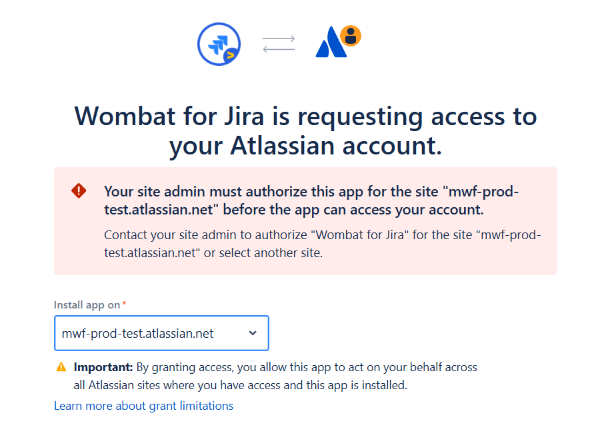
There are 2 ways to solve this:
-
Ask your site admin to connect first, or
-
Allow user app installs within Connected apps → Settings
Ask your site admin to connect first
Once an admin completes the connection, the app is registered on your Jira site and everyone else can connect normally — with no change to your organisation's app policy.
Steps for the admin:
-
Open Google Chat and start a direct message with the Wombat for Jira bot. (If the bot isn't in your Google Workspace yet, install it from the Google Workspace Marketplace first.)
-
Click Connect, or send
/jira-connect. -
Sign in to Atlassian, choose the Jira site, and click Accept.
-
Tell the affected users to click Connect in the bot again.
This authorises the app and connects the admin's own account only. Every user still connects individually and sees only the Jira data their own permissions allow. for
Alternative: allow user app installs
If an admin connecting doesn’t work for you, you can ask the admin to disable Block user app installs:
-
Go to Settings→ Marketplace apps → Take me there → Connected apps.
-
Open the Settings tab.
-
Click Allow user apps for User Installed Apps.
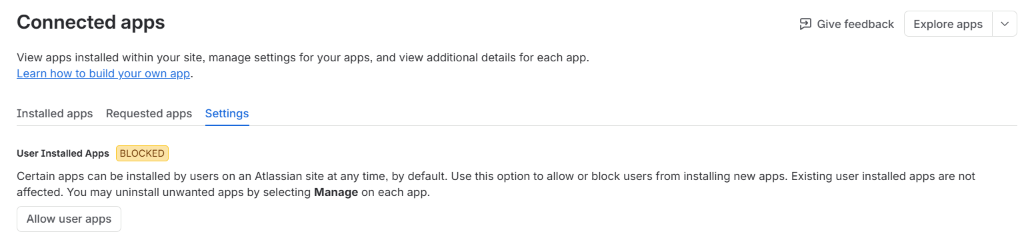
This applies to every app, not just Wombat for Jira, so weigh it against your security policy. Having an admin connect once is the narrower change.
Help
If an admin has connected and it still fails, contact us with your Jira site URL and a screenshot of the error on the Atlassian page.